
Aviator GAME india
How to Play Aviator on Mobile: App APK Download vs. Browser Play
A lot of players search for Aviator app download, Aviator game download, or even Aviator APK when they want the fastest way to start playing on mobile. That makes sense. The game is quick, the rounds are short, and the idea of having Aviator ready on your phone sounds almost too good to ignore.
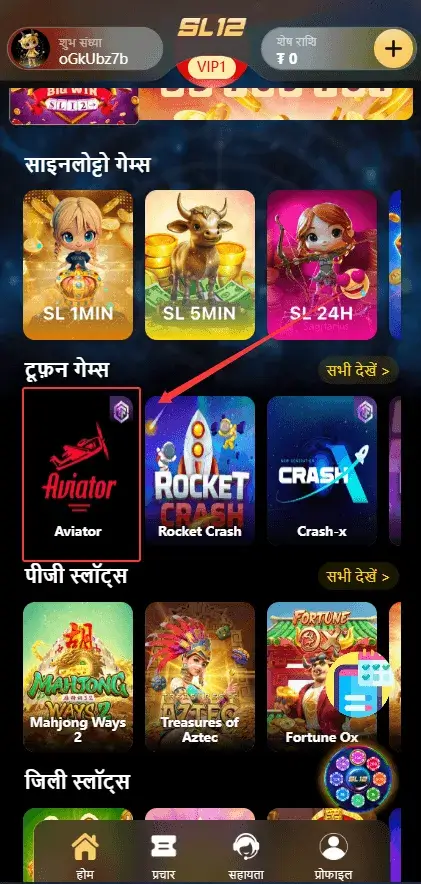
Here is the honest answer. In most cases, there is no standalone official Aviator real-money APK for players in the way people imagine. Real-money access usually happens through a trusted betting platform app or its mobile website.
That means Android users may install the operator’s app if the platform provides one, while iPhone users normally use Safari and add the platform to the Home Screen for faster access.
So before you download anything, the real goal is not to chase a random file with the word “official” on it. The goal is to make sure you are using a legitimate platform that actually offers Aviator, supports your region, and handles login, payments, and withdrawals properly.
The Truth About “Standalone” Aviator Apps
Here is the part many players do not hear clearly enough.
Spribe presents Aviator as a game that lives inside casino and betting platforms, not as a standalone real-money mobile app for players. On Spribe’s own Aviator page, the game is shown as part of its game portfolio, and real-money play pages from operators point users to the operator’s site or app to access the game on mobile.
That means when you open Google Play and type in “Aviator,” the app you see there is usually not the real-money Spribe game in the way most players imagine it. Public Google Play listings under the name “Aviator” often turn out to be arcade-style flying games, offline plane games, or apps with virtual rewards and no real-money value. Even “predictor” apps openly say their rewards are virtual and have no real-world monetary value.
That is why many Aviator game APK pages in search results can be misleading. Some look official at first glance. Some use the right name, the right colours, and the right promises. But that still does not mean they are the real-money mobile version players are actually looking for.
A page can say “download now” all day long. That does not make it the right place to start.
Think about that for a second.
You believe you are downloading the real cash game.
What you actually get might be a paper-plane simulator, a block-shooting arcade game, or some fake predictor app dressed up with the right keywords. The name says Aviator. The icon looks close enough. The promises sound exciting. But it is still the wrong product.
That is how a lot of players get misled. Not because they are careless. Because the store listing gives them just enough confidence to keep going.
The real-money version works differently. You usually play it inside an authorized betting or casino platform app, or through that platform’s mobile website. In other words, the game is embedded inside the operator’s system. The operator handles the account, deposits, withdrawals, login, and mobile access. The game itself is the product inside that bigger platform. That is the normal setup shown on real-money operator pages that offer Aviator on mobile.
So if you are asking, “Where is the official standalone Aviator APK for real money?” the honest answer is this:
That is usually the wrong question.
The better question is:
Which trusted platform actually offers Aviator on mobile for real money, and do they support safe login, payments, and withdrawals in my region?
That question will save you a lot more trouble than chasing random APK files ever will.
And let’s be real again. If some page is screaming “official Aviator APK download” but gives you no clear operator name, no proper payment information, and no real explanation of how mobile play actually works, that is already a warning sign. In this space, a vague app promise is often just bait with a better thumbnail.
How to Start Playing Aviator on Mobile
Now that we have cleared up the app confusion, the next question is obvious.
So how do you actually start playing Aviator on mobile the right way?
The short answer is this. You do not need to chase random APK files all over the internet. You do not need to hunt for some mysterious “secret app” either. What you really need is a trusted platform that already offers Aviator on mobile.
If you are searching for an Aviator game download, the safer move is to start from a trusted platform that already offers Aviator on mobile instead of chasing random files from unknown pages. That is where many players go wrong. They spend more time hunting for a magic download than checking whether the platform itself is real.
The smarter move is simpler. Start with the platform. Then use the version it gives you.
That is how most real players do it.
You open the platform on your phone, sign in or create your account, and head straight to the game section. Once Aviator is there, the rest feels simple. The layout is clean. The round starts fast. And within a few taps, you are already in the air.
If you are brand new, do yourself one favour. Do not rush your first few rounds like you are late for a train. Take a moment. Look at the buttons. Watch how the multiplier moves. Get used to where the cash-out sits on your screen. On mobile, comfort matters. If your fingers are not ready, the game can punish you very quickly.
That is why many players start small, even if they already understand the game in theory. Reading about Aviator is one thing. Feeling the timing on a phone screen is something else. A round can look easy until the plane starts climbing and your brain suddenly wants to wait one second longer.
And that is usually the second that hurts.
The good news is that once you are on the right platform, mobile play feels natural. You are not trying to force the game into your phone. It is already built for this kind of fast, tap-and-react experience. The real mistake is usually not the game itself. It is starting from the wrong place, with the wrong file, or with the wrong expectations.
If you want the safer starting point first, go back to our Aviator India homepage and begin there before you jump into random downloads.
App vs. Browser: Which Is the Best Way to Fly?
This is the part many players keep asking about.
Should you play Aviator on the app, or is the mobile browser already good enough?
The honest answer is simple.
Both can work well.
The better option depends on how often you play, how much storage your phone has, and how stable your internet is.
Speaking of browser play, the biggest advantage is convenience.
You do not need to download anything.
That means no extra app, no storage pressure, and no stress about APK warnings or random installation issues. You just open Chrome or Safari, log in, and play.
That setup makes a lot of sense if you only play once in a while. Maybe you just want a few quick rounds during a break. Maybe your phone is already full of photos, videos, and apps you barely touch. In that case, the browser keeps things light and simple.
Still, browser play has its weak spot.
It adds a little friction.
You may need to log in again. You may need to reload the page. And if your network stutters at the wrong moment, that small delay can hurt. In India, that matters. A lot. Mobile data is not always smooth. One second the signal looks fine, and the next second the screen freezes just long enough to make you miss the cash-out.
That is where the app starts to feel better.
A proper platform app usually opens much faster.
It often keeps you logged in, loads quicker, and feels smoother during play.
In a game like Aviator, that matters more than people think. This is not a slow slot game where you can relax and wait. This is a game where a split second can decide whether you leave at 1.80x or lose the round completely.
The app version also feels more settled in daily use. You tap it, and you are in. No extra tabs. No typing. No hunting for the site again. For regular players, that smooth routine can make the whole experience feel a lot more natural.
Of course, the app is not perfect either.
You do need to install it, update it, and give it some space on your phone.
That may not sound like a big deal, but for a player using an older device or limited storage, it is still something to think about.
For many players, that is also the easiest way to avoid the whole Aviator APK mess. No extra file. No install warning. No guessing whether the download page is real or just dressed up to look convincing. You open the site, log in, and play.
That kind of simplicity is worth a lot, especially when you just want to get into the game without second-guessing every step.
So what is the fair conclusion?
If your phone has low storage, if you only play now and then, or if you simply do not want another app sitting on your device, the browser is absolutely fine.
If you play every day, care about fast access, and want the smoothest possible response when the multiplier starts moving, the app is usually the better choice.
There is no fake “pro player” answer here.
Browser for light, casual play. App for speed, routine, and daily use.
That is the real difference.
Quick Comparison: App vs Browser
| Feature | Browser Play | App Play |
|---|---|---|
| Setup | No download needed | Needs installation |
| Storage | Takes almost no space | Uses phone storage |
| Speed | Good, but depends more on page loading | Usually faster to open |
| Login | May require repeated login | Often stays logged in |
| Smoothness | Can feel less stable during weak network moments | Usually smoother for quick reactions |
| Updates | No manual updates | Needs updates from time to time |
| Best For | Casual players / low-storage phones | Frequent players / speed-focused users |
Quick System Requirements
The good news is that Aviator is usually lightweight on mobile. You do not need a premium device to enjoy it, and most modern phones can handle it without much trouble.
For Android users, the exact requirements depend more on the operator’s app than on the game itself. Some platform apps are very light, while others may need a bit more storage and a newer system version.
For iPhone users, the bigger factor is usually not raw phone power. It is whether the platform runs smoothly in Safari or through a Home Screen shortcut.
In simple terms, if your phone responds well, your browser or app opens properly, and your connection is stable, you are usually in a good position to play without issues.
How to Safely Install the Aviator APK (Android & iOS)
If you are on Android, the setup is usually pretty simple. You download the file, tap it, and your phone may stop you for a second with a warning. Don’t panic when your phone gives you that message. That warning is part of Android’s normal protection system when you install something from outside Google Play. The key point is not the warning itself. The key point is where the file came from. If you are using our trusted platform link, that is very different from grabbing a random APK from some shady page with too many promises and no real operator behind it.
On many Android phones, you will need to allow installs from that source before the file opens properly. Usually, that means your phone takes you to a setting like Install unknown apps or Allow from this source. Turn it on for the browser or app you used to download the file, finish the install, and then you are good to go. That sounds scarier than it really is. It is just Android asking, “Are you sure you trust this source?” If the APK came from the right place, you are fine. If you want the bigger mobile picture before you install anything, head back to our Aviator India homepage and start there.
If you are on iPhone, things work differently. You cannot install an APK on iOS. That is just not how Apple handles apps. But here is the little trick many players like. Open the platform in Safari, tap Share, then tap Add to Home Screen. That puts a clean icon on your iPhone so it feels a lot like a real app. You tap it, it opens fast, and it keeps the whole thing simple. No weird files. No fake “iPhone APK” nonsense. Just a cleaner way to launch the site you already trust.
And let’s be honest, that iPhone method is good enough for most people. If what you want is fast access, easy launch, and something that feels app-like without messing around, the Home Screen shortcut does the job nicely. If you are still nervous about suspicious downloads, random “modded” apps, or predictor tools hiding inside fake files, read our Aviator Predictor guide before you install anything that does not feel right.
Quick FAQ Before You Download
Not really. Aviator is a lightweight game. It does not behave like a giant action game with heavy graphics and huge downloads running in the background. If your connection is decent, the data use is usually pretty modest. What matters more is stability, not raw data usage. A weak connection can hurt your timing more than your data balance.
No. The download itself should be free. If some page is trying to charge you just to get the app file, that is already a bad sign. A proper platform gives you access to the mobile version without making you pay for the install. Save your money for your bankroll, not for some sketchy “premium download” trick.
No. iPhones do not install APK files. If you are using iOS, the easier option is to open the platform in Safari and add it to your Home Screen for quick access.
It can be safe if you are downloading from a trusted platform. The warning is Android’s normal security check. The real risk comes from random APK files from unknown websites, not from the setting itself.
Not at all. Aviator is a lightweight game. Even an older budget phone can usually run it smoothly as long as the touchscreen responds well and the internet connection is stable.
That depends on how you play. If you play once in a while or want to save space, the browser is fine. If you play often and care about speed, the app is usually the better choice.
Yes, you can.
The important thing is understanding how it works. In most cases, the real-money version of Aviator is not a standalone app sitting by itself in an app store. It is usually offered inside a trusted betting or casino platform on mobile. That means you either play it through the platform’s app or through the mobile browser version of that same platform. If you start from the right place, mobile play can feel smooth, fast, and just as real as desktop play.
For most beginners, the browser is usually the safer and simpler place to start. You do not need to install anything, you do not need to deal with APK warnings, and you avoid a lot of confusion around fake downloads. If you only play once in a while or just want to get comfortable first, the browser is more than enough. The app becomes the better option when you play more often and want faster access, smoother loading, and less friction during quick rounds.
Yes. A proper Aviator game download should not cost you anything. If a page is trying to charge you just to hand over an APK file, that is already a bad sign. A trusted platform gives you access to the mobile version without making you pay for the download itself.
Not always. That is where many players get confused. Some Aviator game APK pages point to apps that are not the real-money version people expect. The real game is usually offered inside a trusted betting or casino platform on mobile.
The safer move is to start from a trusted platform instead of searching random APK pages. That helps you avoid fake apps, misleading download links, and versions that only use the Aviator name to get clicks.
Ready to Take Off?
Whether you choose the browser or the app, the real rule is simple: play safe first. Skip the shady files. Use a proper platform. If you are ready to fly, use our official link to get the right version, start clean, and claim your welcome offer.